WordPress Plugins
Build an astrology website on any theme with the official AstrologyAPI plugin. Add Vedic and Western astrology using native Gutenberg blocks or shortcodes, without writing an API integration.
Live results require a paid AstrologyAPI.com plan that includes the features you use. Demo mode lets you build and style pages with sample data before subscribing.
Get the official AstrologyAPI plugin on WordPress.org and add astrology features to your site with blocks and shortcodes.
Get PluginInstall the plugin
Open Plugins → Add New in your WordPress dashboard, search for AstrologyAPI, and click Install Now.
Activate & connect
Activate the plugin, then open Settings → AstrologyAPI. Enter your User ID and API key, or access token, and click Test connection. Use Demo mode to start with sample data.
Configure your experience
Choose your language, accent colour, report layouts, forms, and PDF branding under Settings → AstrologyAPI. Adjust cache and visitor limits to suit your site.
Add it to your page
Edit a page and add a block from the AstrologyAPI category, or paste a shortcode into a Shortcode block. Configure the feature, preview the result, and publish your page.
Set up WooCommerce report sales (optional)
Install WooCommerce and create a product. Select a report under Product data → General → AstrologyAPI report, then add
[astrologyapi_pdf_report product_id="ID"]to your page.Configure paid PDF delivery (optional)
Turn off Free PDF downloads so reports can only be bought. Add your logo and contact details in PDF settings. After payment, reports are generated automatically and delivered on the order page and in the order email.
Available astrology features
One plugin brings these astrology features to your WordPress site. Choose the readings and reports you want to offer, then add them to your pages with blocks or shortcodes.
- Horoscopes
- Display daily, weekly, and monthly sun-sign horoscopes with a zodiac picker. Offer today, tomorrow, or yesterday readings in a server-rendered format that supports search visibility.
- Kundli / birth chart
- Create Basic, Advanced, or Custom birth reports with divisional charts, planets, dashas, doshas, and remedies. Organize Kundli insights in tabs or an accordion to suit your pages.
- Kundli matching
- Show Ashtakoot compatibility across 36 gunas with a score ring and match summary. Include Rajju and Vedha dosha checks alongside Manglik comparisons for both birth charts.
- KP astrology & Lal Kitab
- Explore KP charts, cusps, planetary significators, and star, sub, and sub-sub lords. Add Lal Kitab insights covering planets, houses, ancestral debts, and remedies for each planet.
- Varshaphal & muhurta
- Offer annual and monthly forecasts with charts, Mudda dasha, Tajik yogas, and strength analysis. Display Hora and Chaughadiya periods for a selected date, highlighting the current period.
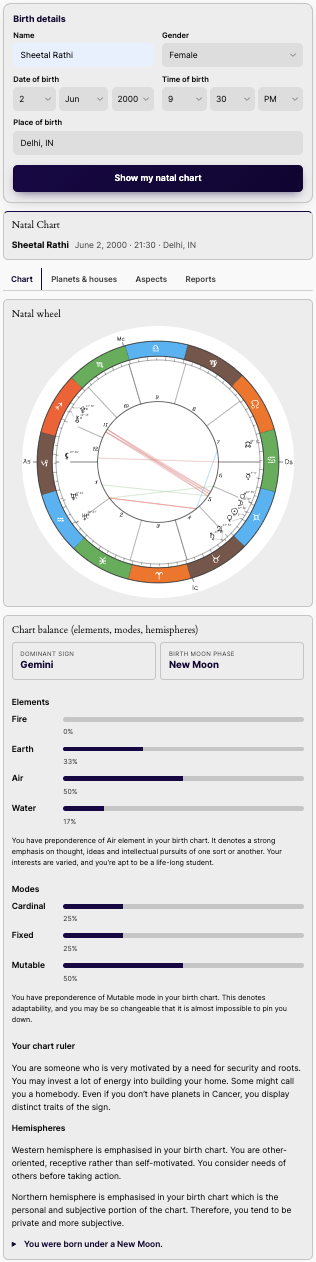
- Western natal chart & solar return
- Present natal wheels, planets, houses, aspects, and chart balance with personality reports and transits. Add solar return charts and yearly forecasts for a complete Western astrology experience.
- Love compatibility
- Explore relationships through synastry aspects, composite charts, and couple forecasts. Offer love, karma and destiny, and friendship reports to help visitors understand compatibility across both birth charts.
- Numerology
- Offer Indian and Western numerology with name, destiny, life path, expression, and soul urge numbers. Include personality insights, challenges, daily predictions, and personal day and month readings.
- Moon phase & Chinese zodiac
- Display the moon phase to scale with illumination, moon sign, and distance. Add Chinese zodiac readings with animal signs, elements, personality traits, and forecasts for the year.
- Tarot & Panchang
- Create interactive Tarot readings with card-flip reveals and custom artwork. Display Panchang for a selected date and place using cards, a classic table, or a compact widget.
- PDF reports
- Generate branded horoscope and match-making PDFs with your logo and contact details. Offer basic, mini, or professional reports with optional email delivery and sales through WooCommerce.
Configurations
Manage site-wide defaults under Settings → AstrologyAPI, then override supported options for individual blocks and shortcodes.
- Connection & demo mode
- Authenticate with a User ID and API key or an access token. Test the connection in settings, or enable Demo mode to preview sample data. Credentials can also be defined with AAPI_USER_ID, AAPI_API_KEY, or AAPI_ACCESS_TOKEN in wp-config.php.
- Language & appearance
- Choose English, Hindi, Marathi, Bengali, Tamil, Telugu, Malayalam, or Kannada. Set a site-wide language and override it per block or shortcode. Labels can follow the report or site language. Set an accent colour; other fonts and colours inherit your theme.
- Default location
- Set the default place, latitude, longitude, and time zone. Place autocomplete resolves visitor locations with automatic, DST-aware time zones.
- Report layouts & content
- Choose Basic, Advanced, or Custom Kundli reports, tabs or an accordion, report sections, and divisional charts. Set Panchang to cards, a classic table, or a compact widget. Choose a daily, weekly, or monthly horoscope period and supply your own Tarot artwork.
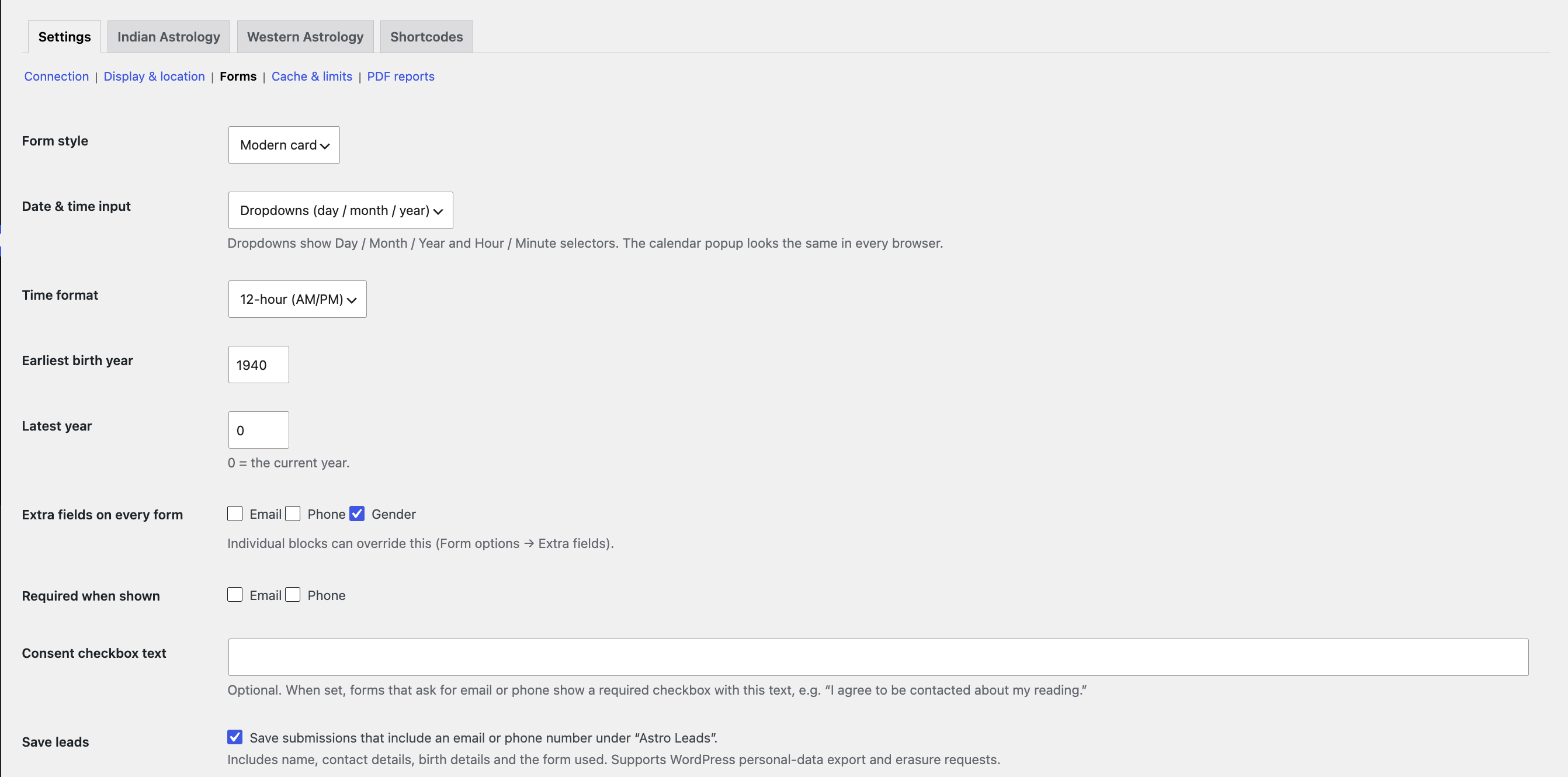
- Forms & lead capture
- Choose Modern card, Classic, or Minimal forms. Use date/time dropdowns, a calendar popup, or browser pickers; configure the year range and 12/24-hour time. Add optional email, phone, and gender fields, required flags, consent text, and custom button labels. Enable or disable private lead saving and export leads as CSV.
- PDF branding & delivery
- Configure chart style, company name and information, logo, website, footer link, email, and phone details. Enable or disable free PDF downloads and email delivery.
Frequently asked questions
Do I need an AstrologyAPI.com account?
Yes. Live data requires a paid AstrologyAPI.com plan. Demo mode lets you try the features with sample data first.
Will it work with my theme or page builder?
Yes. Use shortcodes in any theme, widget area, or page builder, or add the native Gutenberg blocks.
How do I change the colours or templates?
Pick an accent colour under Settings → AstrologyAPI → Display. Other styles inherit your theme. For deeper changes, use the CSS variables on .aapi or copy templates into yourtheme/astrologyapi/.
Can I use Hindi or another Indian language?
Choose the language under Settings → AstrologyAPI → Display or per block / shortcode (for example, lang="hi"). Both API data and plugin labels use that language. Translations for Hindi, Marathi, Bengali, Tamil, Telugu, Malayalam, and Kannada are included.
Can I keep my API key out of the database?
Yes. Define AAPI_USER_ID, AAPI_API_KEY and/or AAPI_ACCESS_TOKEN in wp-config.php.
How do rate limits work behind Cloudflare or a proxy?
The per-visitor limit uses the connecting IP address. Configure the aapi_client_ip filter to read the real visitor IP from your trusted proxy header, such as HTTP_CF_CONNECTING_IP for Cloudflare. Raise or disable the limit under Settings → AstrologyAPI → Cache & limits.
Does the plugin store personal data?
Forms with email or phone fields can save submissions as private Astro Leads visible to administrators, together with birth details. Disable lead saving or add a consent checkbox in the form settings. CSV export and WordPress personal-data export/erase are supported. Birth details are sent to AstrologyAPI.com to calculate results.